Build A Mech Wiki Overview
A quick map of every hub on buildamech.wiki.
What this wiki covers
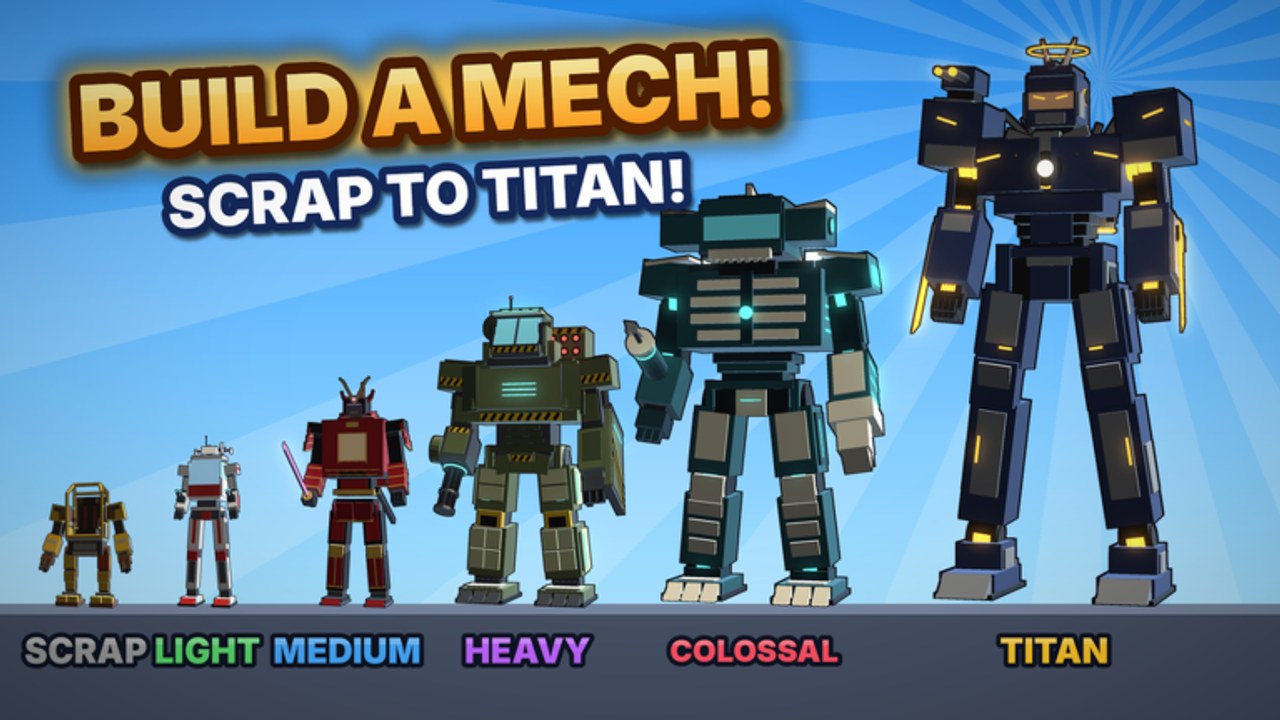
Fan guides for Build A Mech! by Gerwinfootball on Roblox — a free-to-play incremental simulator released around 12 October 2026. Grow from a rusty scrap bot to a giant Titan, collect parts in 11 arenas, build toward 30 mechs, chase paints up to 1 in 10,000, earn cash offline, and pilot every mech in about 4-player servers.
This page is the table of contents. Dive into the hubs below whenever you need a specific answer, then return here when a patch reshuffles priorities.
Hub directory
- Codes Hub — Current code status (none active as of November 2026) and free progression tips. Pair it with How to Redeem Codes so you are ready the moment a working code appears.
- Guides Hub — Full walkthrough set: Getting Started, Farm Parts, Build Mechs, and Arenas.
- Tier List Hub — Prioritize frames with the Mech Tier List and chase cosmetics via the Paint Tier List.
- Scripts Hub — Community autofarm notes, loadstring documentation, and a hard safety disclaimer.
- Tools Hub — Practical helpers led by Cash & Offline Earnings.
- Updates Hub — Patch mindset and November 2026 status so you re-check the right pages after live ops changes.
- Players Hub — Creator links, Discord etiquette, and small-server co-op habits.
Quick start path
- Read Getting Started for the scrap-to-Titan loop.
- Run efficient routes from Farm Parts.
- Spend cash with intent using Build Mechs.
- Protect idle income with Cash & Offline Earnings.
- Compare frames on the Mech Tier List before expensive upgrades.
- Climb difficulty with the Arenas Guide.
- Recheck Codes and Updates after events.
Game facts at a glance
- Platform: Roblox only
- Price: Free-to-play
- Creator: Gerwinfootball
- Release: around 12 October 2026
- Loop: Collect parts, deposit, build mechs, pilot them, earn offline
- Scale: 11 arenas, about 30 mechs, paints up to 1/10,000 rarity
- Servers: About 4 players
- Codes (November 2026): No confirmed active redemption system
How to use this wiki after a patch
When Gerwinfootball ships a balance or UI change, start at Updates, then reopen the matching guide instead of guessing. Economy tweaks usually touch Cash & Offline Earnings and Farm Parts. New frames or paint odds belong on the Tier List Hub. Script breakage notes live on Scripts — remember automation can violate Roblox rules.
Editorial notes
This is an unofficial fan wiki. Facts stay aligned across pages: Roblox-only, online co-op in small servers, released free-to-play experience, no confirmed codes yet, scrap-to-Titan fantasy. We do not invent YouTube video IDs. For official announcements, use channels linked from the Players Hub.
Enjoy the hangar — deposit often, upgrade with intent, and see you in the arenas.
Frequently Asked Questions
Quick answers to the most common questions.
Is this the official Build A Mech wiki?
No. It is a fan-made resource. Prefer Gerwinfootball and official Discord posts for authoritative news.
Where should I start reading?
Open Getting Started, then Farm Parts and Build Mechs. Use this overview anytime you need the hub map.
Are there working codes listed here?
Check the Codes Hub. As of November 2026 no active redemption system is confirmed.
Do I need scripts to finish the wiki path?
No. Follow Guides, Tools, and Tier List pages first. Scripts are optional, risky, and documented only for awareness on the Scripts Hub.
How often should I re-read this overview?
After major updates or whenever you feel lost. The hub directory above always points to the latest dedicated pages including Updates.